

Broker Info Panel MT5 is a simple and practical indicator for traders who want to see important broker and symbol information directly on the chart without opening multiple platform windows.
The indicator shows the current Bid and Ask prices, spread, tick size, tick value, minimum and maximum lot size, volume step, stop level and freeze level.
It is especially useful when checking a new broker, symbol or account type, because trading specifications can be different from one broker to another.
The indicator does not place, modify or close any trades. It is only an information panel.
You can choose which information is displayed from the indicator inputs. The refresh interval can also be adjusted.
Main features:
• Live Bid and Ask prices
• Spread in points and price
• Tick size and tick value
• Minimum and maximum volume
• Volume step
• Broker stop level
• Freeze level
• Adjustable refresh interval
• No external DLLs or third-party libraries required
Installation:
Copy BrokerInfoPanel.mq5 into the MQL5\Indicators folder.
Compile the file in MetaEditor.
Attach the indicator to any chart.
The broker and symbol information will be displayed on the chart.
The values shown by the indicator are taken from the trading specifications provided by your broker, so they may vary depending on the broker, account type and selected symbol.
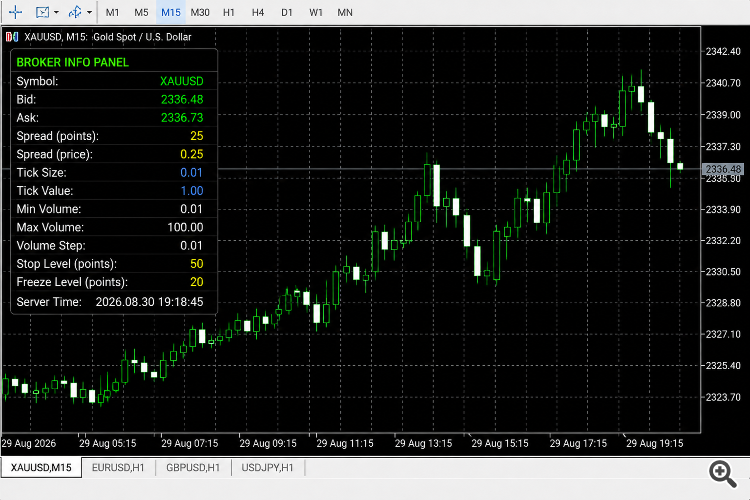
The indicator shows the current Bid and Ask prices, spread, tick size, tick value, minimum and maximum lot size, volume step, stop level and freeze level.
It is especially useful when checking a new broker, symbol or account type, because trading specifications can be different from one broker to another.
The indicator does not place, modify or close any trades. It is only an information panel.
You can choose which information is displayed from the indicator inputs. The refresh interval can also be adjusted.
Main features:
• Live Bid and Ask prices
• Spread in points and price
• Tick size and tick value
• Minimum and maximum volume
• Volume step
• Broker stop level
• Freeze level
• Adjustable refresh interval
• No external DLLs or third-party libraries required
Installation:
Copy BrokerInfoPanel.mq5 into the MQL5\Indicators folder.
Compile the file in MetaEditor.
Attach the indicator to any chart.
The broker and symbol information will be displayed on the chart.
The values shown by the indicator are taken from the trading specifications provided by your broker, so they may vary depending on the broker, account type and selected symbol.
Attachments
Last edited: