

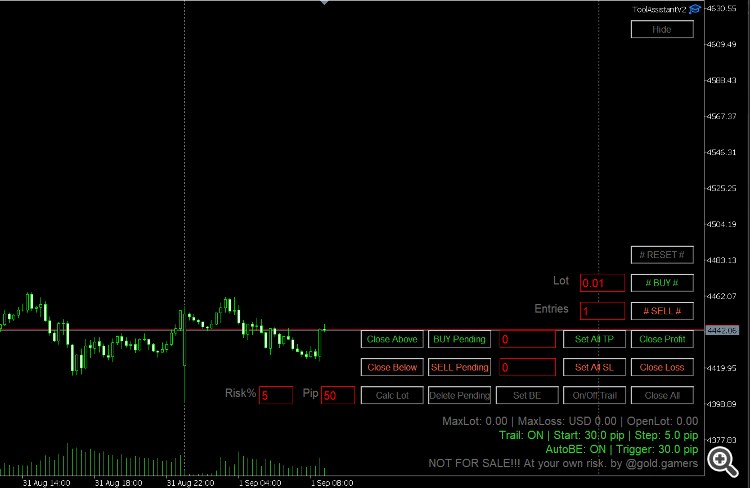
Entries The number of entries to open when clicking the #BUY# and #SELL# buttons.
# BUY # Open BUY entries based on the Lot and number of Entries.
# SELL # Open SELL entries based on the Lot and number of Entries.
Close Profit Closes ALL orders that are currently in profit.
Close Loss Closes ALL orders that are currently at a loss.
Close ALL Closes ALL currently open orders.
Set All TP Enter the Take Profit value (on the left button) and click the Set All TP button to apply it to ALL currently running orders.
Set All SL Enter the Stop Loss value (on the left button) and click the Set All SL button to apply it to ALL currently running orders.
On/Off Trail the trailing function ON or OFF.
Buy Pending Enter the price on the right button to create Buy Limit order
Sell Pending Enter the price on the right button to create Sell Limit order
Delete Pending Removing all of pending orders
Close Above Will close all orders above the price that you input on the right button (middle text box)
Close Below Will close all orders below the price that you input on the right button (middle text box)
EA Parameter Descriptions
TimerSecondRun Trailing (ifActive/True will run every second based on the entered value.
Break Even if true then all order with empty Stop Loss will be set to BE
Trailing default If the Trailing Default parameter is set to True (Active)
Pending Order this value Stop Loss and Take Profit on pip will used for action Buy Pending / Sell Pending button
Lot Size Calculator
Type Risk% & Pip (Stop Loss) values then Calc Lot then information about maximum Lot & Loss will displayed below
# BUY # Open BUY entries based on the Lot and number of Entries.
# SELL # Open SELL entries based on the Lot and number of Entries.
Close Profit Closes ALL orders that are currently in profit.
Close Loss Closes ALL orders that are currently at a loss.
Close ALL Closes ALL currently open orders.
Set All TP Enter the Take Profit value (on the left button) and click the Set All TP button to apply it to ALL currently running orders.
Set All SL Enter the Stop Loss value (on the left button) and click the Set All SL button to apply it to ALL currently running orders.
On/Off Trail the trailing function ON or OFF.
Buy Pending Enter the price on the right button to create Buy Limit order
Sell Pending Enter the price on the right button to create Sell Limit order
Delete Pending Removing all of pending orders
Close Above Will close all orders above the price that you input on the right button (middle text box)
Close Below Will close all orders below the price that you input on the right button (middle text box)
EA Parameter Descriptions
TimerSecondRun Trailing (ifActive/True will run every second based on the entered value.
Break Even if true then all order with empty Stop Loss will be set to BE
Trailing default If the Trailing Default parameter is set to True (Active)
Pending Order this value Stop Loss and Take Profit on pip will used for action Buy Pending / Sell Pending button
Lot Size Calculator
Type Risk% & Pip (Stop Loss) values then Calc Lot then information about maximum Lot & Loss will displayed below
Attachments
Last edited: